


Click here to subscribe to the “Good Financial Cents” Podcast in iTunes.
I have a confession.
I suffer from a slight case of ADHD.
In addition to that, I am scatterbrained to the umpteenth degree.
From the outside looking in, many people perceive me as a successful individual.
I run a financial planning practice; I run multiple websites; and I have a huge family.
Oftentimes, people wonder how I pull it off – and to be quite frank, sometimes… I have no idea!
I am always looking for ways to increase productivity, and today I wanted to share four methods that have dramatically increased my productivity by 7000%.

How did I arrive at that number? I have no clue. It just sounded really cool for the article title. So, maybe it’s not 7000%, but I assure you, it is a lot!
1. Keep a Notepad and Pen With You at All Times
There is some statistic out there that claims that people are more likely to complete a task if they write it down than if they didn’t write it down at all.
I couldn’t agree more with that – but the problem is, I am not a Type A personality like my wife. She keeps more lists and to-do lists than anyone else I’ve ever witnessed. I’m just horrible at it.
Recently, I started carrying around a notepad where I write down my HIGH FIVE™. My HIGH FIVE’S™ are the five most essential things that I need to do the next day. I write these five things down on a notepad and carry it with me everywhere I go.
Just forcing myself into this habit has had a dramatic impact on getting stuff done.
2. Use Tasks in Gmail
I have no idea how I stumbled upon this, but one day I was messing around on my Gmail account and I found “TASKS”. I felt like I was in heaven.
While the notepad has been extremely helpful, I must confess, that in my ADHD-like behavior, I tend to misplace my notepad at some point during the day.
Having a to-do list that you can’t find doesn’t help you get stuff done!
By adding TASKS to my Gmail account, every time I go to check my email, I see the tasks I need to get done. Since I’m like everyone else out there and check email several times a day, it is a constant daily reminder of what I need to accomplish.
There is nothing more satisfying than checking the box when the item is done!
3. Use Reminders on Your iPhone
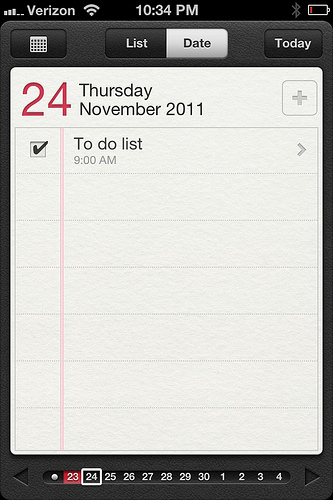
I have the iPhone 4 and recently updated the software to iOS 5. Whenever I did, I noticed a new icon named “Reminders”.
I didn’t pay much attention to it until one day, I started messing around. I was even more excited with this than when I discovered TASKS in Gmail.
Reminders allow you to do your HIGH FIVE™ list each and every day and also put in reminders or alerts to remind you to get the task done.
Once it is completed, you have that awesome check box that gives you the satisfaction of accomplishment that’s needed when get something done!
What’s also cool is that the iPhone reminders system keeps an archive of what you’ve completed, so you can always go back to each day and see the tasks that you need to get done.
If you want to get even more Ninja with it, you can add notes to the task in case there are any intricate details that you need to remember. I am fairly positive that Android has a similar feature on their phone, and I suggest you take advantage.
4. Use a Transcription Service

Writing with no typing necessary
This is the mother of all productivity tools for me, and of the 7000%, I can allot about 6900% from the use of a transcription service!
Mobile Assistant is the company that I use currently to transcribe blog posts, letters to clients, reminders that I want to be emailed to me, responses to emails when it is much easier to talk than type, and also for mailing out letters.
In fact, I am ‘writing’ this blog post by using my transcription service. How freaking cool is that?
This has literally saved me hours upon hours of writing blog articles, remembering important notes that, had I not had the service, I would never have gotten a lot of this stuff done.
If you are a blogger or a business that requires a lot of letters and client notes, I strongly suggest trying the free trial of Mobile Assistant.
The service itself is $72.50 a month, but by using the coupon code ‘financialcents,’ (no spaces) you can save 25%. That’s my gift to you! 🙂
What tools do you use to help increase productivity?
Click here to subscribe to the “Good Financial Cents” Podcast on iTunes.










I loose notepads…. I dunno why. I keep the cardboard pull outs from Kleenex boxes & use those for my lists. They can’t get destroyed easy, are easier to find & don’t fall out of pockets. They also don’t require Internet access.
Also, I make appointment lists in my email calender for target type days so I can plan ahead and schedule accordingly. So As I remember stuff to do next Saturday I can add it to my Saturday to-do appt. I do the same thing for days off, trash night , etc. Then that day I synch the appt & hard copy lists.
I also do project or grocery list emails so if I loose the list I have a back up. I use a date stamp to keep the emails straight …. “Groc_01232017” however that’s also how I track data at work.
I tried the task thing in Gmail & to do on the iPhone, it’s that I have too much to track simultaneously & have a non-standard job. The email calander I can look at anywhere and on any device.
After years of fixing all sorts of different people’s computers and seeing their personal stuff, I can tell you that such things are unique to each person and can also change as life changes.
Hi Sam – I have to agree. There are a lot of great apps available to help you organize your life and your business, but ultimately you have to find what works best for you. It’s perfectly OK if the method that you use is unorthodox or unusual, as long as it helps you.
Great suggestions Jeff! I might also suggest the book, The One Thing, by Gary Keller. Great read about accomplishing the most important thing you can do in any given day and forgetting the rest.
How to increase productivity ( the abridged version)
1. Find a type A wife like Mandy
2. Marry her
3. Rule the Pf world
I use the calendar on my iPhone, reminders on my iPhone, notepads, and a dry erase task board right by the back door to my house. Automating reminders to appear at particular times and days is wonderful. No matter how many tasks I complete, however, more just keep magically appearing.
I don’t know how you do it with a family and all. I struggle and I have no real distractions.
I use a basic reward system. I set 2-3 things that NEED to be done and I set a reward. For example, if I finish a sales page today I can watch a movie. If not, no movie for me.